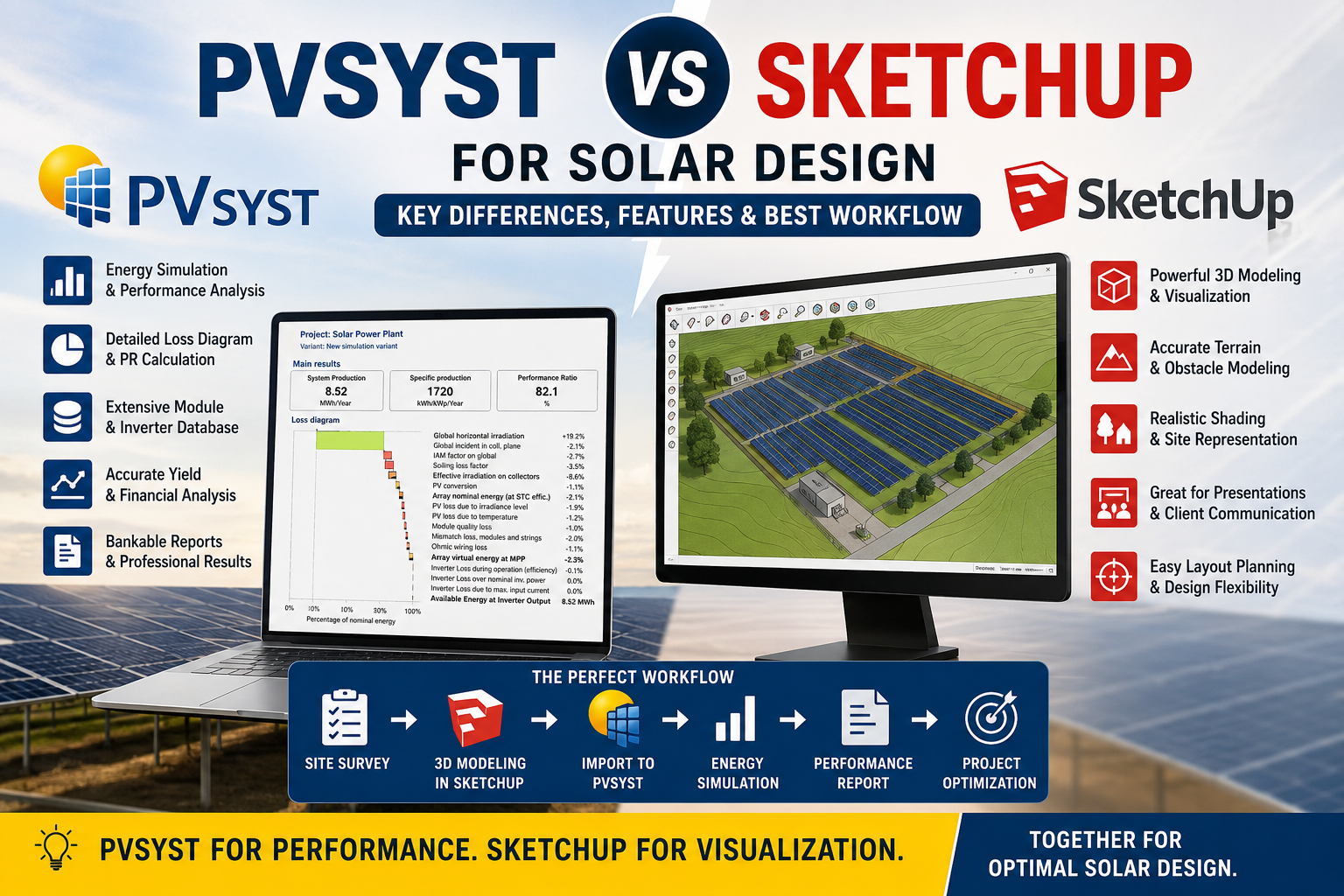
PVsyst vs SketchUp is an important comparison for solar engineers and designers because both software tools are widely used in solar project development but serve different purposes. PVsyst is mainly used for photovoltaic system simulation, energy yield analysis, performance evaluation, and technical reporting, while SketchUp is primarily used for 3D modeling, solar site visualization, and layout planning.
PVsyst vs SketchUp should not be viewed simply as a choice between two competing software programs. They perform different functions and can be used together in a solar design workflow. SketchUp is useful for 3D modeling, terrain visualization, module layout, and presentation, while PVsyst is used for energy simulation, shading analysis, performance ratio calculations, and energy yield estimation.
This comprehensive guide explains the differences between PVsyst and SketchUp, their features, advantages, limitations, and when to use each software in residential, commercial, and utility-scale solar projects.
What is PVsyst?
PVsyst is one of the world's most trusted photovoltaic system simulation software developed specifically for solar power plants. It helps engineers predict how much electricity a solar plant will generate over its lifetime.Unlike CAD software, PVsyst focuses on electrical performance rather than physical modeling.
It allows engineers to simulate:
Annual Energy Generation (MWh)
Performance Ratio (PR)
Specific Yield (kWh/kWp)
DC/AC Ratio
Module mismatch losses
Soiling losses
Temperature losses
Cable losses
Transformer losses
Shading losses
Inverter clipping
Economic analysis
PVsyst follows international standards and is accepted by banks, investors, independent engineers, and EPC companies worldwide.
What is SketchUp?
SketchUp is a professional 3D modeling software used across architecture, construction, civil engineering, and solar engineering.
In solar projects, SketchUp is mainly used to create accurate 3D representations of:
Buildings
Rooftops
Ground-mounted structures
Carports
Terrain
Nearby trees
Chimneys
Water tanks
Transmission lines
Hills
Boundary walls
These models help engineers understand how shadows affect solar modules throughout the year.
SketchUp itself does not calculate energy generation.Instead, it creates realistic
3D models that can be imported into PVsyst for detailed shading analysis.
Why Both Software Are Used Together.
In professional solar engineering, PVsyst and SketchUp are not competing software—they complement each other. Each tool performs a specific role in the solar design process, and using them together results in a more accurate, efficient, and bankable project design.
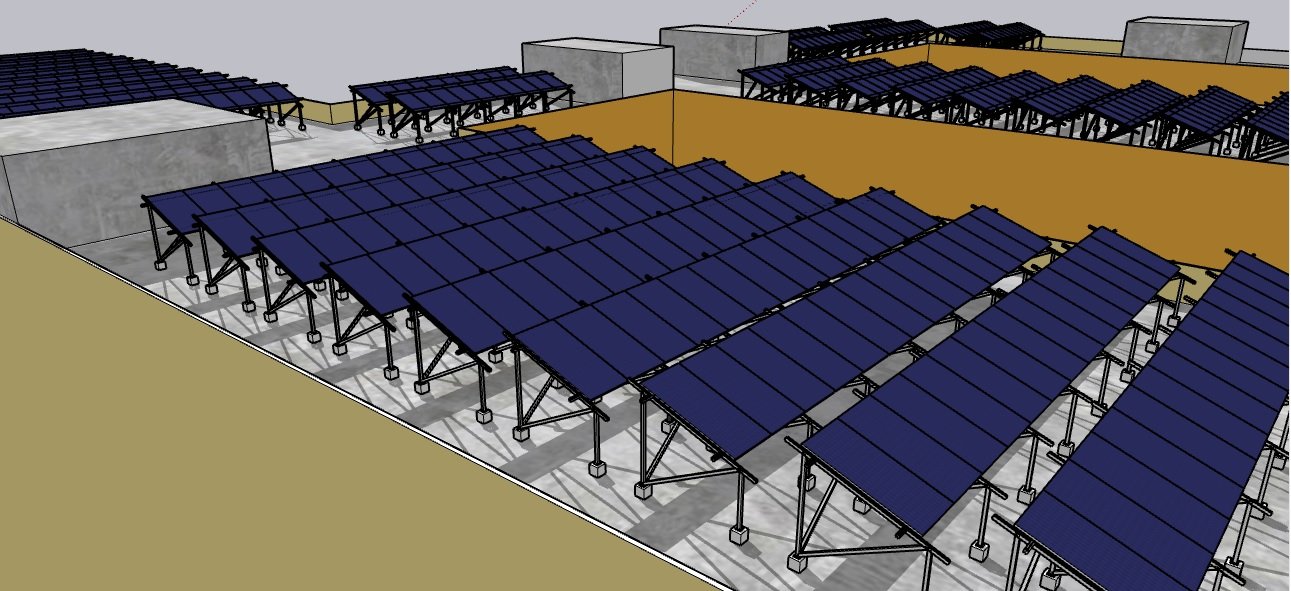
SketchUp is used to create a realistic 3D model of the project site, including rooftops, ground-mounted structures, terrain, nearby buildings, trees, transmission lines, and other obstacles. This detailed model helps engineers visualize the installation and identify potential shading issues before construction begins.
Once the 3D model is complete, it is exported and imported into PVsyst. PVsyst uses this model to perform detailed shading analysis and simulate the plant's electrical performance. It calculates annual energy generation, Performance Ratio (PR), specific yield, system losses, inverter clipping, temperature effects, cable losses, and many other parameters that determine the overall efficiency of the solar power plant.
By combining SketchUp's powerful visualization capabilities with PVsyst's advanced simulation engine, engineers can optimize module placement, reduce shading losses, improve energy yield, and generate reliable performance reports accepted by clients, investors, and financial institutions.
Key Benefits of Using Both Software:
Accurate 3D site modeling with SketchUp.
Realistic shading analysis using imported 3D scenes in PVsyst.
Reliable annual energy generation estimates for informed decision-making.
Optimized module layout to maximize solar production.
Professional, bankable simulation reports for project approvals and financing.
Improved collaboration between design engineers, EPC contractors, and project stakeholders.
PVsyst Features Explained.
1. Energy Simulation
The biggest advantage of PVsyst is accurate energy prediction.
It calculates:
Monthly generation
Annual generation
Hourly generation
Seasonal performance
Example:Installed Capacity = 5 MWp
Expected Generation
Yearly Energy = 8.6 GWh
Specific Yield = 1720 kWh/kWp
Performance Ratio = 82%
Loss Diagram
PVsyst automatically calculates every system loss.Typical losses include:
Module quality loss
IAM loss
Soiling loss
Near shading
Temperature loss
Wiring loss
Mismatch loss
Inverter loss
Transformer loss
The loss diagram helps identify where energy is being lost.
Shading Simulation
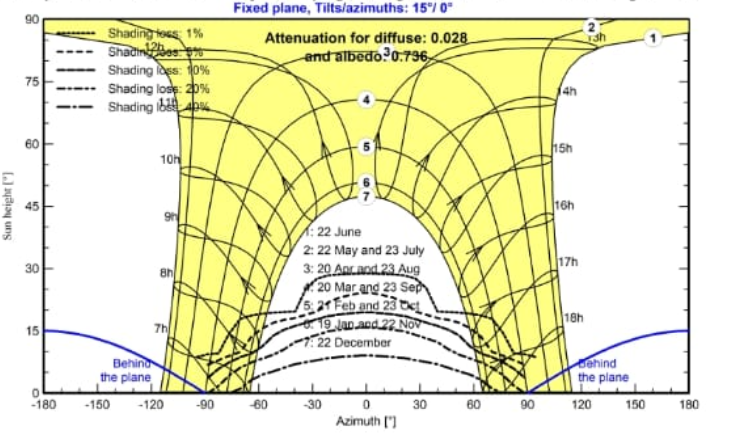
PVsyst imports 3D scenes from SketchUp.
It calculates:
Beam shading
Diffuse shading
Electrical shading
Mutual shading
This provides much more accurate generation estimates than visual inspection alone.
SketchUp Features Explained
1.Professional 3D Modeling
SketchUp creates detailed models of:
Roofs
Solar structures
Buildings
Terrain
Roads
Compound walls
The models are highly realistic and suitable for engineering presentations.
2.Terrain Modeling
SketchUp can accurately represent uneven ground, making it valuable for utility-scale solar farms where terrain significantly affects layout and shading.
3. Obstacle Modeling
Engineers can include all nearby objects, such as:
Trees
Water tanks
Chimneys
Electric poles
Towers
Neighboring buildingsThis helps visualize and evaluate shading before simulation.
4. Presentation Quality
SketchUp is excellent for:
Client presentations
EPC proposals
Tender submissions
Marketing visuals
Construction planning
Advantages of PVsyst
Industry-standard energy simulation
Bankable reports
Detailed loss analysis
Accurate PR calculation
Large equipment database
Financial evaluation
support Reliable shading analysis (with imported 3D scenes)
Widely accepted by lenders and investors
Advantages of SketchUp
Easy-to-use 3D modeling interface
Realistic visualization
Accurate terrain and obstacle modeling
Supports client communication
Useful for layout planning
Compatible with many engineering tools, including PVsyst
Limitations of PVsyst
Limited 3D modeling capabilities
Less suitable for presentation-quality graphics
Requires quality input data for accurate results
Not intended for structural or civil design
Limitations of SketchUp
No energy simulation
No PR or yield calculations
No electrical loss analysis
No inverter optimization
No financial modeling Requires integration with PVsyst for performance assessment
Conclusion
PVsyst and SketchUp are not competitors—they are complementary tools in professional solar engineering. SketchUp excels at creating accurate 3D models of rooftops, ground-mounted systems, terrain, and surrounding obstacles, while PVsyst transforms those models into detailed energy simulations by calculating annual generation, Performance Ratio (PR), shading losses, temperature effects, inverter clipping, and other electrical losses.
For residential rooftop projects, SketchUp helps visualize the installation and identify potential shading, whereas PVsyst validates the expected energy production. In commercial and utility-scale projects, using both tools together is considered industry best practice because it provides realistic layouts backed by bankable performance reports.
If your goal is to deliver high-quality solar designs that are technically accurate and trusted by clients, lenders, and investors, the ideal workflow is to model the project in SketchUp and simulate its performance in PVsyst. This combination ensures that your design is both visually precise and optimized for maximum energy generation.